Dream Weaver Instructions
Welcome to the Dream Weaver! This app helps you detect REM sleep cycles and can optionally wake you during or after a dream, increasing dream recall. It also includes features for lucid dreaming training.
Table of Contents
Features of the App
The "Dream" app allows you to configure both the dream wake alarm and the normal morning alarm. Only use this app if you are getting plenty of sleep and can handle a momentary interruption to your sleep. While this will not work every time, it will increase your ability to remember some dreams. In addition, the lucid dreaming options can help in training to experience lucid dreams, an entirely different level of dreaming!
"Before using this app, I hadn’t remembered a dream in probably over 10 years. Now I’ve had 3 dreams I remember in the past week. Now I’m making sure I get to bed on time and looking forward to it!"
If you need help starting an app, see the help from Garmin for your specific watch. Generally, the app will be started like other activities such as running or biking. When installed, it will probably be at the bottom of the list. You can edit the list to move it closer to the top of the list if you use it frequently.


REM Alarm Configuration
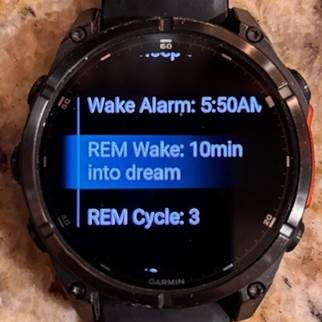
The main menu has the REM alarm configuration. The "REM Alarm:" option allows you to select when the alarm goes off relative to the REM state. For instance, if you select 10min into dream, the alarm will go off 10 minutes after the selected REM state begins. If the REM state selected does not last longer than the alarm delay selected, the next REM state that is long enough for the alarm will trigger the alarm. There will never be more than one REM alarm. Note that the "As finishing dream" option will wait to wake you until after the REM cycle has ended. While least disruptive to the dream, this maybe be too late for dream recall.
The "REM Time" menu controls the REM alarm's timing. You can select from either a certain REM cycle or a certain time after which the REM alarm will trigger. Select the menu item and then choose either the "Cycle Number" or "Time Method". If you select the "Cycle Number" method, you can select the REM cycle that you want to remember. To ensure you have at least one uninterrupted REM state, the earliest REM cycle you can select is REM cycle 2. Generally, you will have 3-5 REM cycles, each generally being longer than the previous ones.
If you select the "Time Method" method, you can select the time after which the REM alarm will trigger. Either method still follows the other REM alarm settings on when in the REM cycle to trigger.
Lucid Dream
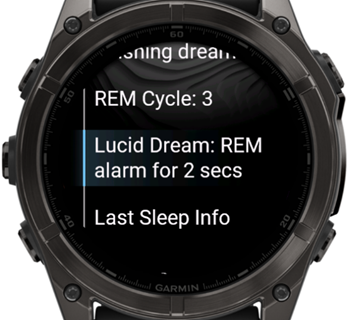
Lucid dreaming is the state of being aware that you are dreaming while still experiencing the dream. In addition to possibly helping to control nightmares, lucid dreaming allows one to start to control the dream with some practice. To facilitate lucid dreaming, enable the Lucid Dream menu to something other than off. This will configure the REM alarm to not require acknowledgement with a button press but simply buzz your wrist (and/or audio) a set number of times. In your dream state, you can learn to detect this and realize you are in a dream. It might require more stimulus initially, so the lucid dream setting allows up to 5s of alarm. If you find you wake too fully with the lucid dream setting, lower the number of seconds it is activated in the menu. You can use the Lucid Dream off mode to see how long it takes you to acknowledge the alarm by checking in the "Last Sleep Info" page for the Awoke in value. Try setting the Lucid Dream alarm for something slightly less than your awoke time.
Last Sleep Info
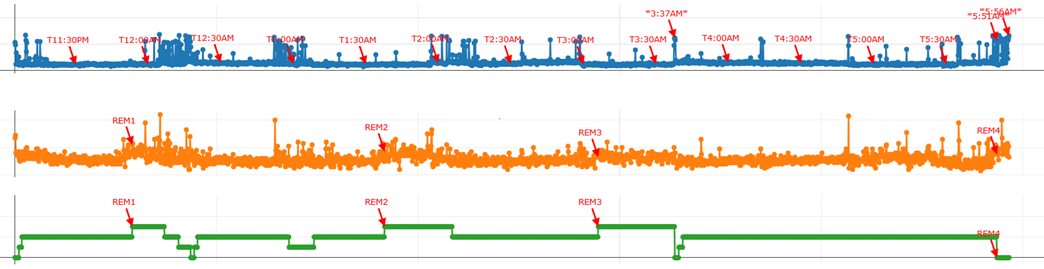
After you have completed a sleep session, the last session you had will be available for reviewing. From this page, you can review the detected REM states (blue), the HR (red trace) and body motion (green trace). The hour time is indicated along the bottom of the graph. If a REM alarm was activated, that will show on the graph as well. At the bottom of the graph, you can see the time it took to respond to the REM alarm. A Lucid Dream setting of something smaller than this can help train you to enter a lucid dream state.
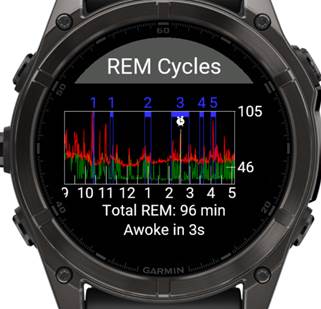
While viewing the graph, tap on the graph area to zoom in, and then you can drag on it to pan left and right to see things in more detail.
Normal Alarm
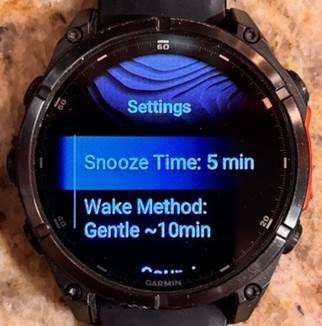
The "Wake Alarm" is the normal morning alarm time. You can configure when it should go off at the latest. In the settings menu, there is an option for the alarm to go off between 5 and 10 minutes earlier than the set alarm if it detects your sleep state is light sleep. This will attempt to wake you more gently when you were close to waking up anyways. Use the "Wake Method" to select a gentle alarm up to the maximum time before the configured alarm.
The "Snooze Time" menu allows you to select how long the alarm is delayed after you select "Snooze" while the alarm is active. This snooze option is only available for the normal alarm, not the REM alarm.
Starting a Sleep Session
After configuring the REM and normal alarm, choose "Start Sleep Session". The watch will summarize the alarm configurations and then go dark. Time to go to sleep!
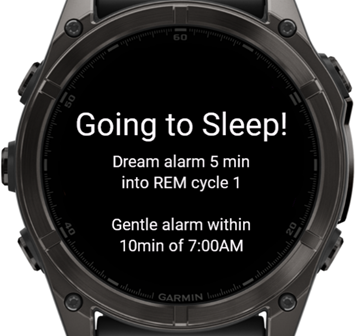
If you need to see the time during the night, rotate your wrist and after a second, the time and current REM cycle will show briefly.
Settings Descriptions
- Snooze Time: Controls how long the alarm is moved back when snooze is selected during an alarm.
- Wake Method: Controls the normal morning alarm behavior. When set to "At Alarm", the alarms behave normally, activating at the selected time. When set to "Gentle…", the alarm will activate up to the selected amount of time earlier than the alarm time. The alarm will activate when it first detects you are in light sleep within this time frame. If no light sleep state is detected before the configured alarm time, it will activate regardless of your sleep state. You can also disable the normal wake alarm here by settingh it for "Alarm Off".
- Alarm Sound: The watch will play a sound when the alarm is activated. Note some watches may have audio muted, so it is recommended to test this or leave vibrate enabled.
- Use Piezo: Use the piezo buzzer for the alarm sound. Only for watches with a piezo and no speaker! This will use the piezo buzzer to grandually increase the volume of the alarm instead of the recorded sound.
- Alarm Vibrate: The watch will vibrate when the alarm is activated.
- REM Alarm Vibrate Only: When enabled, even if the main alarm is set for an audible sound, the REM alarm will stay silent and just vibrate.
- Motion Light: For MIP watches, if enabled the watch will turn on a dim backlight when the watch is moved during the sleep session. This will allow you to more easily read the current time and REM status.
- Motion Shows Time: For MIP and AMOLED watches, if enabled the watch will show the time and REM status when it is moved during the sleep session.
- Preview Wake Alarm: This will play the configured wake alarm for 7 seconds maximum. Toggle back off during alarm to turn it off immediately.
- Preview REM/Lucid Alarm: This will play the configured REM/Lucid alarm for 7 seconds maximum or the currentlly configured Lucid alarm count. Toggle back off during alarm to turn it off immediately.
- REM Avg: This menu does not control anything but shows your current REM average per night. If your average amount of REW is too low, no REM alarm will activate until you exceed 90 minutes of REM for the night.
Special Notes – Read This!
- Make sure your phone has notifications disabled (do not disturb) for sleep or the watch will buzz during the night. Phone notifications will come through while using the sleep activity.
- Make sure to charge your watch sufficiently. The all-night activity will use 5-10% battery, similar to a short run activity.
- Often watches have audio disabled, so make sure the vibrate is enabled.
- If the configured REM cycle is not reached or not long enough, the REM alarm may not trigger. Try again the next night and get better sleep.
- If the average amount of REM you have achieved over the last several days is too low, the REM alarm will not activate until you get at least 90min of REM.
- Short REM cycles or cycles close to the previous cycle are considered the same REM cycle.
- When the REM alarm triggers, simply press the Start/Stop button to acknowledge and return to sleep, but don’t forget your dream!
The app uses the accelerometer and heartrate to detect your sleep state. While the algorithm works for many people it may not work perfectly for you. If you find that it does not work well, please contact the developer.
#sleephack #luciddream
Questions or Feedback?
If you have questions or feedback about the Dream Weaver, please visit the contact page.